Independent Information Website · Not an Official App Operator or Financial Service Provider. Read Our Disclaimer
CLEAR INFORMATION · SMARTER DIGITAL DECISIONS

ComePay App Guide: Login, Register, Download & APK Information

Looking for Come Pay login, the Come Pay app, registration details or a ComePay download? Explore our comprehensive guide to understand the platform name, identify relevant app information, learn about account access and discover important safety checks before downloading any application.

Independent informational website. We do not host, distribute or verify any APK file.

ComePay Guide App Information & Safety
INFORMATION GUIDE
Login Guide APK Safety
Independent Informational Resource
Practical Step-by-Step Guides
Safety First Responsible Information
User Focused Clear Explanations
INTRODUCTION

What Is ComePay? Everything You Should Know

Understand the ComePay name, its online presence, related app searches and the information you should verify before using any service.

ComePay is a name that people search for when looking for information about digital applications, online payment-related services, account access and mobile app downloads. Searches such as ComePay app, ComePay login and ComePay download are common examples of the different ways users try to find information about a platform.

However, it is important to understand that similar brand names do not necessarily represent the same company or service. Different websites and application listings may use similar names while offering different products, features or services. Therefore, identifying the exact publisher and application is an important first step.

Some websites using the Come Pay name describe peer-to-peer (P2P) exchange or wallet-related services. Other app listings using a similar name may describe payment transfers and bill-related features. These descriptions should not automatically be treated as proof of common ownership, official status or shared technology.

If you are searching for Come pay kya hai, the simplest explanation is that ComePay is a name associated with online pages and app-related searches. To understand a particular product, you need to identify the exact website, developer and service being discussed.

Why Are People Searching for Come Pay?

People search for ComePay for different reasons. Some want to access an existing account, while others want to understand what the application does. New users may be interested in registration, while Android users may be searching for an installation file.

Search intent can therefore vary from simple information gathering to account access and application installation. A useful guide should answer these questions without assuming that every search result belongs to the same service.

Understanding the ComePay App Name

A mobile application is software designed to perform specific functions on a smartphone or tablet. Depending on the actual product, these functions may include account management, payments, transfers, transaction records or other digital services.

Before using any application associated with the Come Pay name, review the publisher details, official documentation, privacy policy and terms of use. These documents can help you understand what the product does and what information it may collect.

Is ComePay a Payment App or a P2P Platform?

Payment applications and peer-to-peer platforms can have different operating models. A payment application may facilitate transfers or bill payments, whereas a P2P platform may allow users to interact directly for exchanging assets or completing transactions.

These categories should not be confused. Always check the exact product description and applicable terms before assuming that a service supports a particular transaction type.

What Should You Know Before Using ComePay?

Start by identifying the exact website and application. Verify the developer name, read the privacy policy and check the available customer support information. If the service involves payments or financial transactions, understand the fees, transaction conditions and applicable risks.

Avoid relying on promotional messages or unofficial websites for important financial decisions. A responsible user should understand the product before sharing personal information or making a transaction.
APPLICATION OVERVIEW

Come Pay App: Features and Important Information

If you are researching the ComePay app, understanding its publisher, functionality and permissions can help you make a more informed decision.

01

Application Information

Identify the exact application, its publisher and its intended purpose before installing or using it.

02

Account Management

Understand the available account features and verify the provider's official instructions for account access.

03

Privacy Awareness

Review application permissions and privacy information before sharing personal details.

04

Security Information

Follow basic security practices and avoid suspicious links, unknown downloads and unsolicited requests.

APP VISUAL OVERVIEW

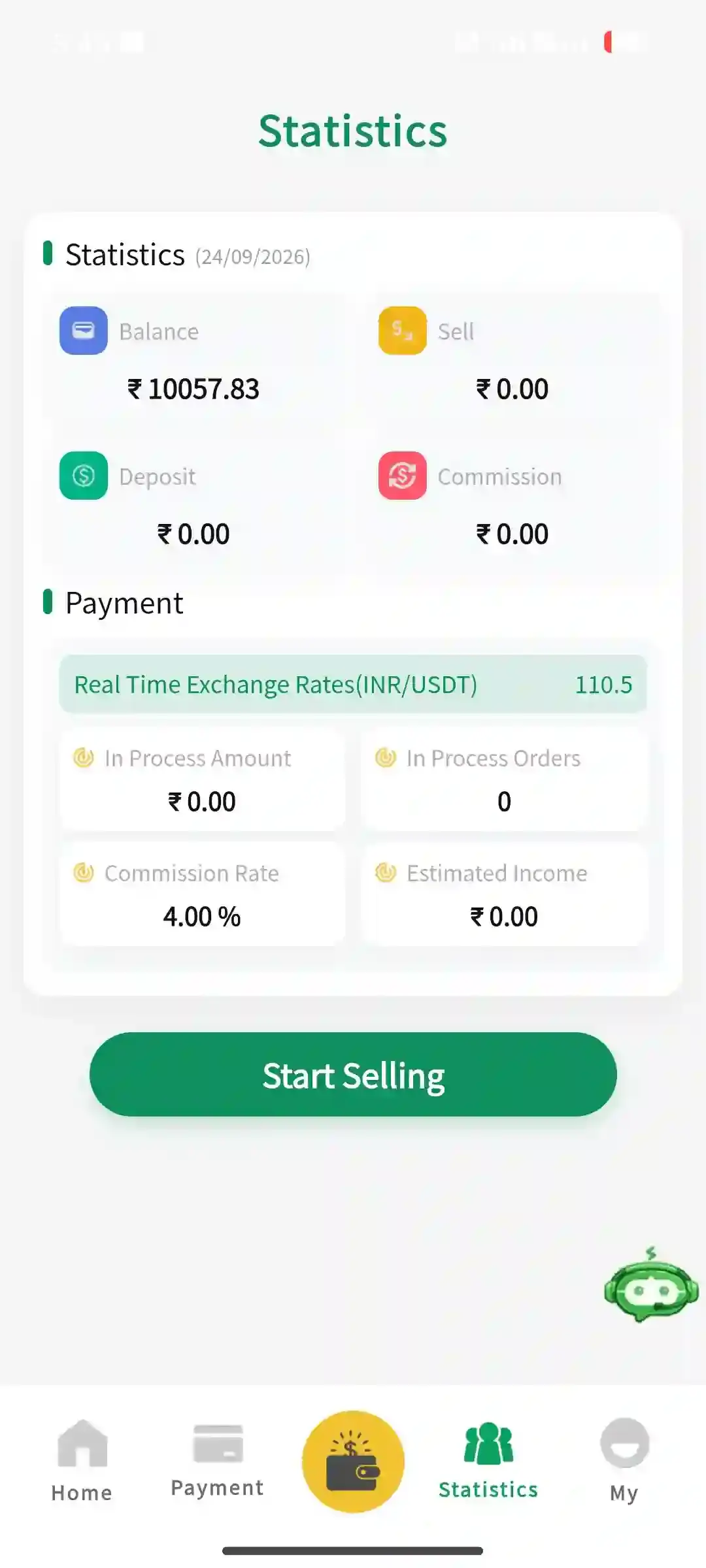
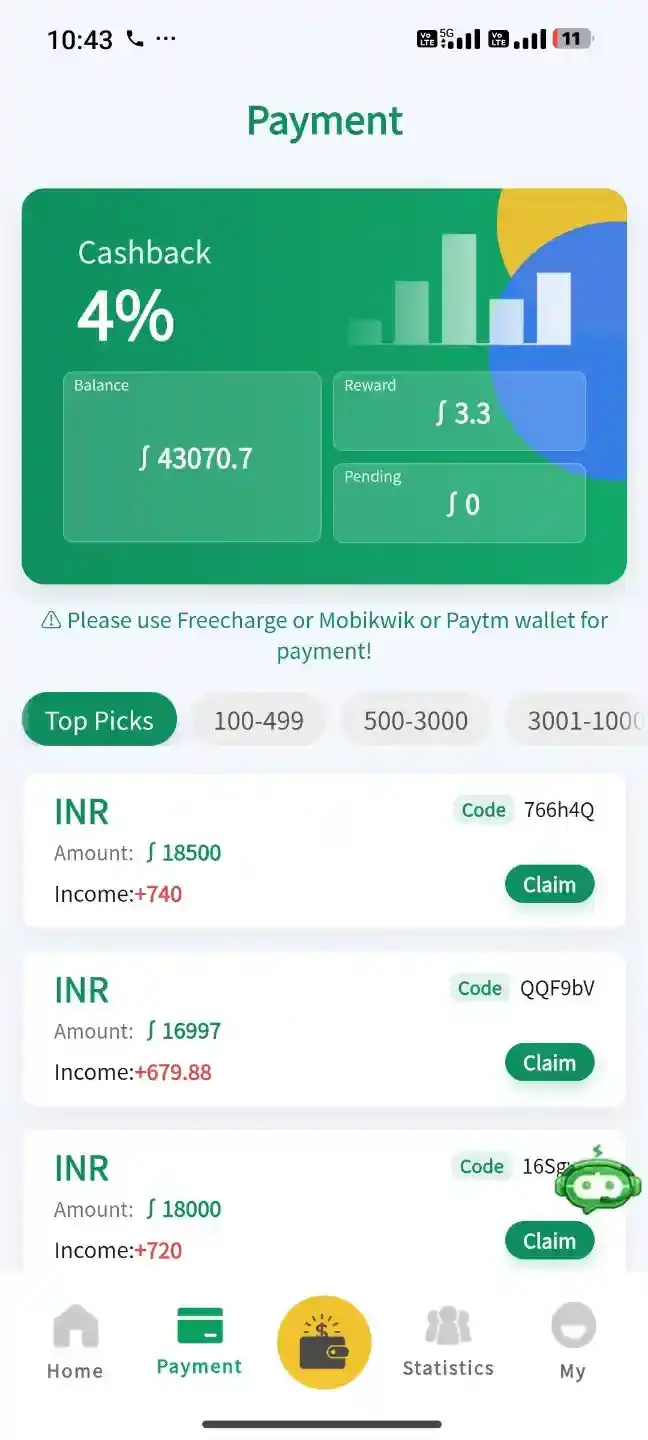
Come Pay App Screenshots

Explore the ComePay application interface through these screenshots. Review the available screens and app-related information.

Screenshots are for informational purposes. Verify the application and publisher before use.

ACCOUNT ACCESS GUIDE

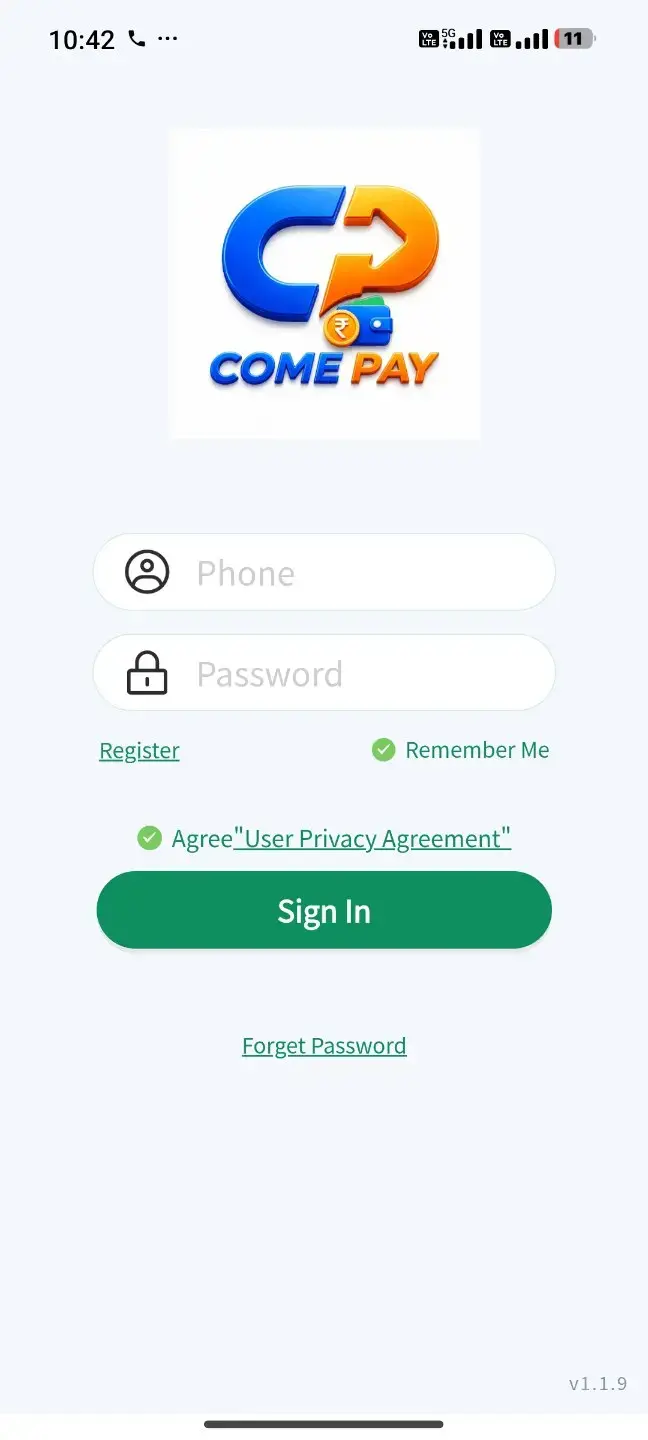
ComePay Login: How to Find the Correct Login Page

Searching for Comepay login or Come pay login? Understand how to identify the correct account access page and protect your login information.

Users who search for Come pay login are generally looking for an existing account sign-in page. Before entering any credentials, it is important to verify that the website or application belongs to the service you actually intend to access.

Similar names and copied website designs can sometimes make it difficult to identify the correct destination. A login page should be checked carefully, especially when it requests sensitive information such as passwords, verification codes or payment details.

Steps to Follow Before ComePay Login

1

Verify the Website Address

Check the complete website address and confirm it through the provider's independently verified documentation. Look for spelling differences and unexpected redirects.

2

Check the Application Identity

Verify the developer or publisher name and compare the details with the information available on the service provider's official channels.

3

Review the Login Screen

Check whether the page displays consistent branding, privacy information and relevant terms. Be cautious if the page requests unusual permissions or unnecessary personal details.

4

Protect Your Credentials

Never share your password, OTP, PIN or account recovery information with anyone. Use a strong and unique password for every important account.

Security Reminder

This website does not provide an official ComePay login portal and does not collect user passwords or account credentials.

NEW ACCOUNT INFORMATION

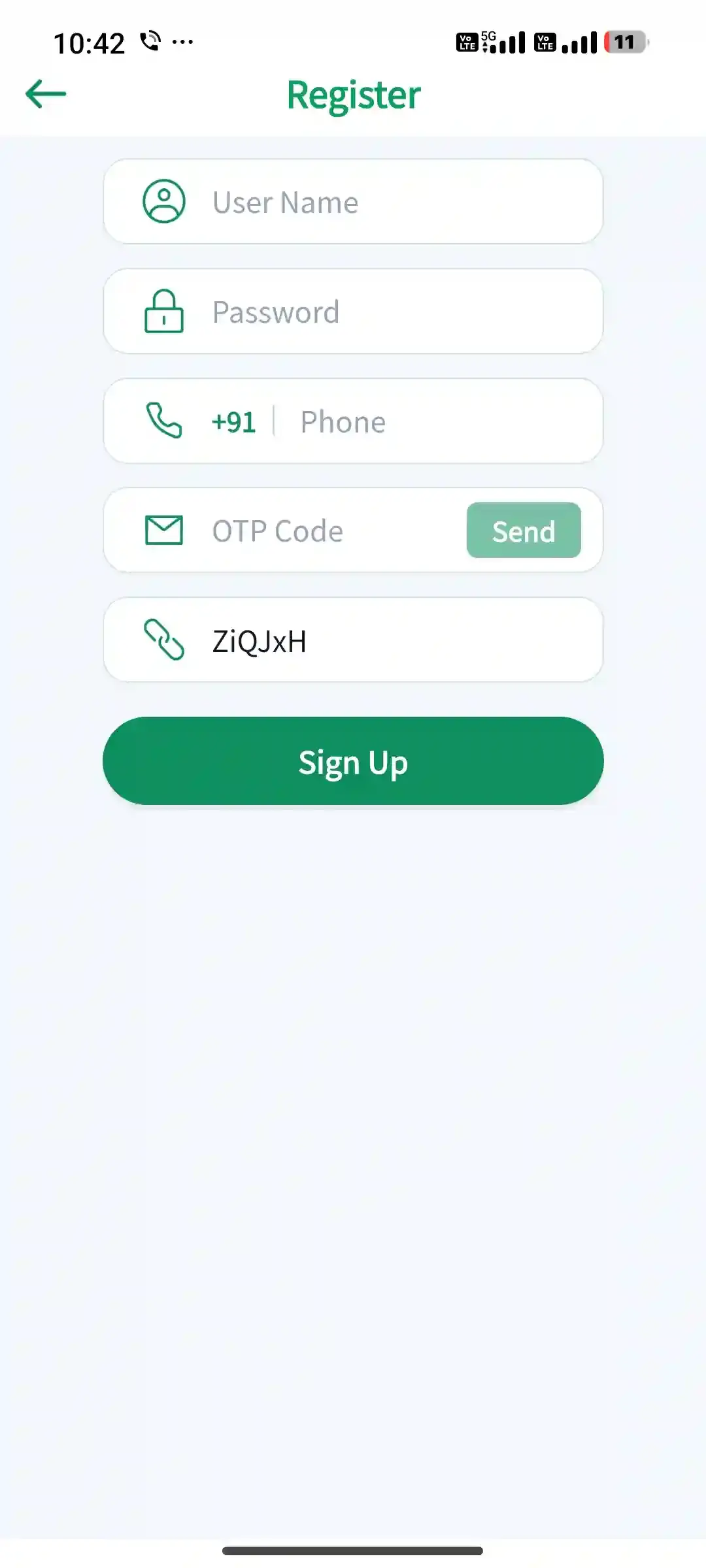
Come Pay Register: Account Creation Guide

Looking for Comepay register information? Learn what to verify before creating an account on an application or website using the ComePay name.

Registration is usually the first step when a user wants to access the features of an online platform. However, registration procedures can differ depending on the product, developer and services offered.

If you are planning to register on a ComePay-related platform, begin by identifying the exact service. Read its terms and privacy policy before submitting personal information. Do not assume that registration instructions published on one website will apply to another application with a similar name.

Information That May Be Required During Registration

Depending on the application, a registration process may request an email address, mobile number, password or identity verification information. Financial services may have additional verification requirements depending on the service and applicable regulations.

Important Things to Check Before Registering

  • Verify the website and application publisher.
  • Read the privacy policy and terms of service.
  • Understand why personal information is required.
  • Check the account recovery process.
  • Understand transaction limits and applicable fees.
  • Confirm that customer support information is available.
  • Never share OTPs or account passwords with anyone.

How to Keep a Newly Created Account Secure

Use a strong password that you do not reuse on other websites. Keep your recovery information private and enable additional account security options whenever they are available.

If you receive an unexpected registration link through a message or social media account, verify the destination independently before opening it.

ANDROID DOWNLOAD INFORMATION

ComePay Download & ComePay APK: Complete Guide

Searching for Come pay apk, Comepay download or Comepay download apk? Understand Android APK files, download safety and the checks you should perform before installing an application.

An APK, short for Android Package Kit, is the file format used to distribute and install applications on Android devices. Android applications may be available through recognised app stores or other distribution channels, depending on the developer.

People searching for ComePay download information may be trying to locate an application installation file. However, finding a file with the correct name does not automatically mean that it is authentic or safe.

A modified or unofficial APK can create security and privacy risks. It may contain unwanted software, request unnecessary permissions or imitate another application. Therefore, it is important to identify the publisher and source before installing any Android application.

How to Check a ComePay APK Before Installation

  • Verify the application developer and publisher.
  • Check whether the file comes from a recognised distribution source.
  • Review the application version and release information.
  • Understand the permissions requested by the application.
  • Read the publisher's privacy policy.
  • Avoid suspicious shortened links and forced redirects.
  • Do not install files received through unsolicited messages.

Why You Should Avoid Unknown APK Files

Unknown APK files may not come from the original developer. Some files can be repackaged or modified, which can introduce unwanted code or expose sensitive information stored on a device.

An application may request access to contacts, SMS messages, files, camera or location. Review whether these permissions are necessary for the advertised functionality. Avoid granting access when the purpose is unclear.

ComePay Download for Android

Android users should first identify the exact ComePay application they are looking for. Check the publisher's documentation and recognised app distribution channels before downloading an installation file.

Do not rely only on the application name, logo or promotional description. Verify the developer identity, app version and privacy information. If the source cannot be verified, it is safer not to install the file.

Can You Install a ComePay APK on an iPhone?

No. APK is an Android application package format. iPhones use a different application distribution and installation system. An Android APK cannot be installed directly as a native iPhone application.

Is This Website Providing a ComePay APK?

No. This website is an independent informational resource. We do not host, modify, distribute or certify any ComePay APK file. We also cannot guarantee the authenticity of files hosted by third-party websites.

Always use the distribution source identified by the actual application publisher and verify the file before installation.

USER SECURITY

Come Pay App Safety: Important Security Tips

Whether you are researching a payment application, digital wallet or online platform, basic security awareness can help protect your information.

01

Protect Your OTP

Never share verification codes, passwords or PINs with another person, even if they claim to be customer support.

02

Verify Website Links

Check website addresses carefully before entering personal details or payment information.

03

Review Permissions

Understand why an application needs access to your device information before approving permissions.

04

Understand Financial Risk

Read all applicable terms and fees. Never assume that any digital platform guarantees income or returns.

Important Safety Notice

Never share your bank PIN, OTP, UPI PIN, password or confidential financial information with unknown people or websites.

VISUAL INFORMATION

Come Pay App Screenshots and Interface

This section is reserved for original and verified ComePay-related screenshots. Add genuine images that accurately represent the application or website being discussed.

APP VISUAL OVERVIEW

ComePay App Screenshots

Explore the ComePay application interface through these screenshots. Review the available screens and app-related information.

Screenshots are for informational purposes. Verify the application and publisher before use.

HELP & SUPPORT INFORMATION

Common ComePay App Problems and Possible Solutions

If you are facing an application or account-related issue, these general troubleshooting suggestions may help you understand what to check next.

App Not Opening

Check your internet connection, restart your device and confirm that your operating system supports the application.

Login Not Working

Verify that you are accessing the correct service and follow its documented password recovery instructions.

OTP Not Received

Check your mobile signal, registered number and message settings. Never share a verification code with anyone.

Download Problem

Verify the download source, application compatibility and available device storage before installing an application.

Transaction Pending

Check the transaction status through your bank or relevant payment provider and keep the reference number.

Suspicious Website Link

Avoid submitting information, preserve the website address and report suspicious activity through appropriate channels.

FREQUENTLY ASKED QUESTIONS

ComePay Frequently Asked Questions

Find answers to common questions about ComePay login, registration, application information and Android APK downloads.

1. Come pay kya hai?

ComePay is a name used across online pages and app-related services. Different websites may describe different products, so verify the exact publisher and service before using it.

2. Where can I find ComePay login?

Use only the login destination published by the provider you have independently verified. This informational website does not operate a ComePay login portal.

3. How can I complete ComePay register?

Registration requirements depend on the specific application or service. Review its eligibility conditions, terms and privacy policy before submitting personal information.

4. Where can I find the ComePay app?

Identify the exact application and verify its publisher through a recognised distribution channel. Similar names do not prove common ownership.

5. Is ComePay APK available for download?

Third-party pages may refer to a ComePay APK, but this website does not host or verify installation files. Check the publisher and source independently.

6. How can I download ComePay APK?

First identify the exact application and its verified publisher. Only use a distribution source that the publisher itself identifies and avoid unknown APK files.

7. Is ComePay available for Android?

Availability depends on the specific application. Check its current listing and device compatibility before installing it.

8. Can I install ComePay APK on iPhone?

No. APK is an Android application package format. iPhones use a different application distribution system.

9. Is ComePay a safe application?

Safety depends on the exact application and publisher. Review its permissions, privacy practices, terms and available support information.

10. Why are there multiple ComePay websites?

Different websites or publishers may use similar names. Similar branding does not establish common ownership or official status.

11. Does ComePay guarantee earnings?

This website makes no income or investment return promises. Financial activities, digital assets and online transactions can involve risk.

12. What should I do if I share an OTP?

Immediately contact your relevant bank or service provider through a verified channel, secure your account and report any unauthorised activity.

13. How do I find a genuine ComePay link?

Verify the website address through the actual service provider's documented channels. Do not trust unsolicited messages or suspicious redirects.

14. How do I contact ComePay customer support?

Use contact details published by the verified publisher or provider. Avoid sharing confidential account information with unknown support contacts.

EXPLORE MORE

Learn More About ComePay Guide

Explore our website information and policies to understand the purpose and scope of this independent resource.

A

About Us

Learn about the purpose, editorial approach and informational focus of our website.

Read About Us →
C

Contact Us

Find information about contacting the website editorial team for general feedback.

Contact Us →
D

Disclaimer

Understand the limitations and independent informational nature of this website.

Read Disclaimer →
P

Privacy Policy

Read how website-related information and personal data are handled.

Privacy Policy →
INFORM YOURSELF BEFORE YOU ACT

Verify First. Understand the Service. Then Decide.

Make informed digital decisions by checking application identity, privacy practices, website authenticity and relevant terms before using any online service.

Read Our Disclaimer →